


Are you tired of spending hours on content? The rise of AI writing assistants has changed the game. In 2025, the top AI tools for content generation are changing how we work.
Imagine automating content creation without losing quality or relevance. Descript, Jasper AI, and Grammarly are at the forefront.
They offer features that make writing easier and workflows smoother. These top 10 AI content creation tools are essential for anyone looking to improve their writing or workflow.
Key Takeaways
- Discover the top 10 AI tools that are transforming the content creation landscape.
- Learn how AI writing assistants can enhance your writing quality and efficiency.
- Explore the benefits of content creation automation for marketers and SEO professionals.
- Find out how these tools can revolutionize your workflow in 2025.
- Get insights into the standout features of the best AI content generation tools.
The Rise of AI Content Creation Tools
The world of content creation is changing fast with AI content creation tools. What was once seen as gimmicky is now seen as helpful and efficient.
Experts say, “AI tools for content creation are evolving so fast it’s hard to keep up.” This quick change is thanks to better AI technology.
AI content creation tools are not just changing how we make content; they’re changing it. They help businesses make lots of high-quality content quickly.
This saves time and money compared to old ways of making content. A recent quote said, “What used to feel gimmicky and robotic now actually feels helpful.”
There are many good things about using AI content writing tools. They make work faster, improve content quality, and let you make more content.
These tools help content creators by doing repetitive tasks and suggesting how to make things better.
As things keep changing, AI blog posts and other AI content will become more common. Companies that start using these tools early will get the most benefits.
Key Benefits of Using AI Content Creation Tools
AI content creation tools have changed how businesses make and share content. They use content creation automation and AI writing assistants to improve content making.
Increased Efficiency and Productivity
AI content tools make content making faster and better. Companies using AI tools see a 32% increase in operational efficiency. They also spend 45% less time on repetitive tasks.
This lets teams do more creative and strategic work. It boosts productivity overall.
Cost Savings and Scalability
AI content tools also save money and grow with your business. They help cut down the need for big writing and editing teams. This lowers costs.
AI can make lots of content quickly. This helps businesses keep up with digital changes without spending more.
Improved Content Quality and Consistency
Many think AI content is low quality. But, AI writing assistants and content intelligence tools can make content better. They use natural language generation to create engaging content.
This content connects well with the audience. Keeping a consistent tone and style across all content strengthens the brand. It builds trust with the audience.
Jasper AI: The Ultimate AI Writing Assistant
For businesses aiming to grow their content, Jasper AI is a top choice. It’s designed for marketers and businesses needing lots of on-brand copy.
Jasper AI is a key tool for AI content generation tools. Its smart algorithms create content that speaks to the audience.
Features and Capabilities
Jasper AI has many features that make it a favorite among best AI content writing tools. It includes:
- Advanced content generation capabilities
- Customizable tone and style to match brand voices
- Integration with various content management systems
- Real-time collaboration tools for teams
A user said, “Jasper AI has changed our content making, letting us create high-quality content fast.” Many agree, making Jasper AI their top AI copywriting tool.
Use Cases and Success Stories
Jasper AI works well in many fields, like marketing, advertising, publishing, and education. It’s a great tool for any business wanting to use AI writing assistants for content.
Some examples of its use include:
- Writing blog posts and articles quickly
- Creating catchy marketing copy and product descriptions
- Coming up with social media content that grabs attention
As content creation keeps changing, tools like Jasper AI are at the forefront. They help businesses keep up and meet their content goals easily.
The future of content creation is here, and it’s powered by AI.
– Jasper AI User

Copy.ai: Generating Compelling Marketing Copy
Copy.ai isn’t just another AI tool—it’s like having a smart assistant that gets your brand’s voice and helps you craft everything from catchy social posts to persuasive sales emails in seconds.
Built on advanced NLP models (think GPT-3), it’s designed to save time for marketers, writers, and sales teams while keeping content fresh and engaging
Let’s dive into what makes it stand out:
What Can It Do?
Write and Refine Content Effortlessly :
Need a blog post or product description? Just give Copy.ai a quick prompt, and it’ll generate polished drafts.
Stuck with a clunky paragraph? Use its AI rewriting feature to make text sound more natural—like a human wrote it
Free Tools for Quick Wins :
Rewrite Tool : Turn stiff AI-generated text into conversational, human-like prose
Content Idea Generator : Brainstorming fatigue? Get fresh ideas for blogs, ads, or campaigns in a snap.
Well there are more free tools in Copy.ai you can give it a try
Supercharge Your Sales & Marketing :
Automate personalized outreach with AI-researched leads, create hyper-targeted ABM campaigns, or let it analyze sales calls to predict deals and suggest strategies
Workflows That Work :
Automate repetitive tasks (like follow-up emails) with AI “agents” that act on your rules. Think of it as delegating busywork to a robot
Go Global with One Click :
Translate content into multiple languages while keeping the tone spot-on for local audiences.
Security You Can Trust
Worried about data safety? Copy.ai ticks the boxes with SOC 2 and GDPR compliance. Plus, store brand guidelines in its “Infobase” to ensure every AI-generated word aligns with your voice
Need Inspiration? They’ve Got You Covered
Templates : Start strong with pre-built workflows for SEO blogs, sales scripts, or ad copy
Tone Control : Adjust writing style—go formal, casual, or persuasive—with a click
Why It’s Worth a Try
Pros: Blazing-fast drafts, seamless integrations (Salesforce, HubSpot, etc.), and a focus on real-world business needs.
Cons: The learning curve might feel steep if you’re new to AI tools, but the free resources and demos make it easier to jump in
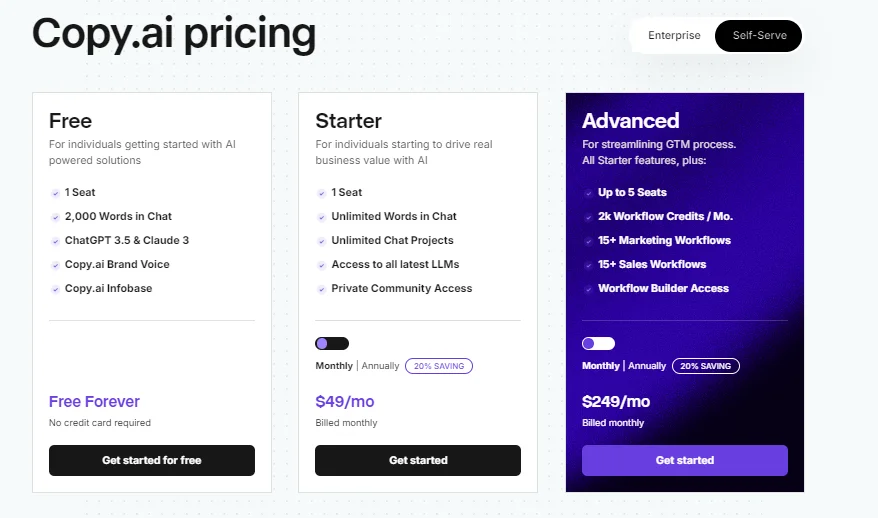
Whether you’re a solo entrepreneur or part of a big team, Copy.ai mixes free tools with enterprise power to fit your workflow. Ready to cut the busywork?
Give it a spin here —no writer’s block guaranteed!
Writesonic: Versatile Content Creation for Various Niches
Writesonic is an AI-driven content platform designed to streamline copywriting, SEO optimization, and multi-channel publishing for marketers, bloggers, and businesses. Founded in 2020 by Samanyou Garg
It combines advanced NLP technology with real-time competitor insights to generate high-quality, search-engine-friendly content. Here’s a breakdown of its capabilities:
Key Features
AI Article Writer :
- Crafts human-like articles faster than ChatGPT by analyzing deep web data, competitor strategies, and internal linking opportunities
- Ideal for blogs, product descriptions, and SEO-optimized content
SEO AI Agent :
- Scans entire websites to identify content gaps, suggest keyword placements, and link related pages for improved search rankings
- Integrates live competitor data to keep content ahead of trends
Free Tools :
AI Rewriter : Refines existing text into plagiarism-free, engaging content
Content Idea Generator : Sparks ideas for blogs, ads, or campaigns in seconds
Customization & Efficiency :
- Offers customizable templates for emails, social media posts, and ad copy
- Supports multi-channel publishing to streamline content distribution
Why It Stands Out
Speed & Accuracy : Generates factually accurate drafts in minutes, reducing manual research and writing time
SEO Focus : Combines keyword analysis and competitor insights to boost organic reach
User-Friendly : Intuitive interface with minimal learning curve, even for AI newcomers
Pros & Cons
Pros :
- Time-saving automation for repetitive writing tasks
- High-quality outputs tailored to brand tone and audience needs
- Affordable pricing compared to enterprise tools like Surfer SEO
Cons :
- Advanced features may require experimentation to master
- Over-reliance on AI could risk originality without human oversight
Who Should Use It?
Writesonic suits solo entrepreneurs, marketing teams, and agencies seeking scalable content solutions. Whether drafting blog posts, crafting ad copy, or optimizing SEO, its blend of speed and customization makes it a versatile tool for 2025’s fast-paced digital landscape
Ready to try? Visit writesonic.com to explore free tools, templates, and AI-generated content tailored to your goals.

Rytr: Budget-Friendly AI Writing Tool
Rytr.me is an AI-driven writing tool designed to simplify content creation for marketers, bloggers, entrepreneurs, and students. Built on advanced NLP and ML algorithms, it generates high-quality text, refines grammar, and mimics user writing styles to produce content that feels authentically human.
With over 8 million users and a 4.9/5 satisfaction rating rytr.me, it’s positioned as a budget-friendly alternative to tools like Jasper and Copy.ai.
Key Features
AI Content Generation :
- Craft blogs, social media posts, ad copy, product descriptions, and even creative writing (e.g., poems, stories) using 40+ templates [[rytr.me]].
- Analyzes your writing style to mirror tone and voice, ensuring outputs align with brand or personal identity
Grammar & Style Enhancements :
- Offers real-time suggestions for grammar, punctuation, and tone improvements
- Tools like Text Inflator , Sentence Shortener , and Rewording Generator refine clarity and conciseness.
SEO Optimization :
- Generates meta descriptions, titles, and keyword-rich content to boost search rankings.
- Integrates Keyword Extractor and AI Keyword Generator for data-driven SEO strategies.
Free Tools & Accessibility :
Chrome Extension : Write directly in Gmail, LinkedIn, or WordPress with AI-powered autocomplete.
Free plan includes 10,000 characters/month, 20+ tones, and access to all templates [[rytr.me]].
Plagiarism-Free Content :
Ensures originality with built-in checks, making it reliable for academic, marketing, or business use this tool
Why It Stands Out
Affordability : Priced at $7.50/month for unlimited generations (vs. Jasper’s $49/month), it’s ideal for individuals or small teams.
Speed & Simplicity : Generates drafts in seconds with minimal prompts, reducing manual effort
Versatility : Supports 40+ use cases, from LinkedIn posts to real estate listings, catering to diverse niches.
Pros & Cons
Pros :
- User-friendly interface with a shallow learning curve
- Strong focus on customization (e.g., personalized tones, SEO tools).
- Cost-effective for moderate content needs
Cons :
- Advanced SEO features (e.g., competitor analysis) lag behind tools like Surfer SEO
- Outputs may require human editing for nuanced or highly technical topics
Who Should Use It?
Rytr excels for solopreneurs, students, and small businesses needing quick content drafts, social media updates, or email campaigns. Its free plan suits casual users, while the $24.16/month Premium tier caters to freelancers managing multiple clients.
However, enterprise teams requiring deep analytics or large-scale content workflows might find it limiting.
Ready to test-drive?

AI-Writer
AI-Writer is an AI-driven writing platform designed to streamline content creation for academics, marketers, and businesses needing trustworthy, source-backed articles.
Built on advanced NLP models, it generates high-quality text, refines existing drafts, and integrates SEO strategies to boost visibility. With a focus on accuracy and citation, it positions itself as a reliable tool for research-heavy or professional use.
Key Features
- 1-Click Article Generation :
- Input a headline, and the AI crafts detailed articles enriched with credible sources, eliminating the struggle of starting from scratch 6.
- Ideal for blogs, academic papers, product descriptions, and marketing copy.
- SEO & Customization Tools :
- Keyword Selector : Identifies optimal keywords to improve search rankings.
- Topic Suggest 2.0 : Recommends related topics for comprehensive content planning.
- Rewording + Proofreading : Polishes grammar, tone, and clarity for polished outputs.
- Academic & Professional Focus :
- Generates up to 10,000 words per article with properly cited sources, making it suitable for research papers, essays, or whitepapers 5.
- Supports rewriting and email/social media content creation for diverse use cases.
- Free Trial & Pricing :
- Offers a free trial and paid plans starting at $29/month for unlimited generations.
Why It Stands Out
- Trustworthiness : Emphasizes factual accuracy and cited sources, a rare feature among AI writing tools.
- Speed & Simplicity : Creates structured drafts in minutes, reducing manual research and writing time.
- Niche Strengths : Excels in academic and SEO-optimized content compared to general-purpose tools like Jasper or Rytr.
Pros & Cons
- Pros :
- Source-backed content for academic/professional credibility.
- User-friendly interface with minimal learning curve.
- Affordable pricing for long-form content needs.
- Cons :
- Limited creative flexibility for storytelling or casual writing.
- Advanced SEO features (e.g., competitor analysis) trail behind tools like Surfer SEO.
Who Should Use It?
AI-Writer suits students, researchers, and marketers needing structured, research-backed content.
Its focus on citations and SEO makes it ideal for academic papers, product reviews, or SEO-optimized blogs.
However, enterprise teams requiring deep analytics or multi-channel publishing might prefer tools like Copy.ai or Writesonic.

Article Forge: Generating Long-Form Content at Scale
Article Forge is an AI-driven platform designed to automate content creation for marketers, bloggers, and businesses seeking efficient, SEO-friendly articles.
Leveraging advanced algorithms and latent semantic indexing (LSI) technology, it generates unique, high-quality content in minutes, positioning itself as a budget-friendly solution for scaling written output
Key Features
- AI Content Generation :
- Automatically crafts full-length articles, blog posts, and product descriptions from a single keyword prompt, claiming to be the “world’s most advanced” AI writer.
- Uses LSI to ensure contextually relevant keywords and semantic depth for improved SEO performance.
- SEO Optimization :
- Analyzes top-ranking content to suggest keyword density, related terms, and structural improvements 110.
- Generates meta descriptions, titles, and headings tailored to search intent 6.
- Pricing & Accessibility :
- Basic Plan ($27/month) : Up to 30 articles monthly.
- Pro Plan ($57/month) : Up to 60 articles, priority support, and team collaboration features
- Offers a free trial for testing outputs before commitment.
- User Experience :
- Minimal learning curve with a straightforward interface, ideal for non-technical users
- Allows rewriting, proofreading, and customization of tone or style
Why It Stands Out
- Speed & Efficiency : Creates publish-ready drafts in seconds, reducing manual research and writing time .
- Affordability : Competitively priced compared to tools like Jasper ($49+/month), making it accessible for small businesses.
- SEO Focus : LSI-driven keyword strategies aim to boost organic rankings, a key differentiator for marketers .
Pros & Cons
- Pros :
- Fast generation of SEO-optimized content.
- Cost-effective for moderate content needs.
- Simple interface with minimal setup required.
- Pros :
- Cons :
- Outputs often require human editing for nuance or technical accuracy.
- Limited creative flexibility for storytelling or niche industries.
Who Should Use It?
Article Forge suits bloggers, SEO specialists, and businesses prioritizing volume and keyword targeting over creative flair.
It’s ideal for generating foundational drafts, product descriptions, or niche website content. However, enterprises needing highly polished, brand-specific copy may prefer tools like Copy.ai or Writesonic.

Synthesia: AI-Powered Video Content Creation
Let’s face it: making professional videos used to mean hiring actors, setting up cameras, and editing for hours. Enter Synthesia —an AI tool that turns text into videos with virtual presenters, all without touching a camera.
Think of it as your shortcut to creating training videos, marketing clips, or social media content faster than ever. Here’s what you need to know:
What Can Synthesia Do?
Create Videos From Text :
Just type a script, pick an AI avatar (over 230 to choose from!), and let the platform do the rest. The avatars look and sound eerily human-like, thanks to their EXPRESS-1 model that captures subtle facial expressions and natural movements.
Go Global in a Snap :
Need videos in Spanish, French, or even Japanese? Synthesia generates voiceovers in 140+ languages, complete with subtitles. Perfect for businesses targeting international audiences.
Customize Without the Hassle :
Add logos, tweak colors, or swap backgrounds to match your brand. Want to update a video later? No reshoots needed—just edit the text and regenerate.
Collaborate and Scale :
Teams can work together in shared spaces, while templates and document-to-video converters save time on repetitive projects. Integrations with tools like HubSpot or Salesforce make it a breeze to embed videos into workflows.
Why It’s Cool (And Where It Falls Short)
- Pros :
- Fast & Affordable : Turn ideas into polished videos in minutes—no camera crew required. DuPont, for example, saved $10,000 per training video using Synthesia.
- User-Friendly : No tech skills needed. Just type, choose a template, and hit “generate.”
- Diverse Avatars : Models vary by age, ethnicity, and gender, helping you create relatable content.
- Cons :
- Not Fully Realistic : While the avatars are impressive, some users note they still lack the emotional depth of real humans .
- Limited Creative Control : Compared to tools like InVideo, customization options (e.g., music, advanced animations) are more basic .
Who’s It For?
- Businesses : Training videos, product demos, or internal comms become a breeze.
- Marketers : Quickly create multilingual ads or social posts.
- Educators : Make engaging course materials without filming yourself.
- Budget-Conscious Creators : The free plan gives you 3 minutes of video/month to test the waters 6.
Pricing
- Free Plan : Basic avatars, 3 minutes/month.
- Paid Plans : Start at $23/month for more features. Enterprise teams get custom pricing for advanced needs 5.
Final Thoughts
Synthesia isn’t perfect for Hollywood-level storytelling, but it’s a game-changer for quick, professional-looking videos.
If you’re tired of endless editing or want to scale content without breaking the bank, it’s worth a try.

AISEO: Plagiarism-Free, SEO-Ready Content
Want to create high-quality, SEO-friendly content that actually ranks—and passes as human-written?
AISEO might be your new secret weapon. Built on advanced NLP models like GPT-4, this tool promises to turn basic prompts into polished, undetectable articles, blog posts, and even marketing copy.
Plus, with its humanizer feature, it’s designed to dodge AI detectors like Turnitin and Originality.ai
Key Features
- Undetectable Content Generator :
- Input a keyword or topic, and AISEO crafts SEO-optimized articles that blend seamlessly into search results. Over 6 million such pieces have been generated to date.
- The Humanizer tool rewrites AI-generated text to feel more natural, making it ideal for students, bloggers, and marketers who need to bypass strict AI checks.
- SEO Optimization Made Easy :
- Automatically identifies keyword gaps, suggests high-traffic terms, and generates meta descriptions/titles to boost rankings.
- Competitor analysis tools help you outshine rivals by mirroring their top-performing content strategies.
- Multilingual Support :
- Create content in 26+ languages , from Spanish and French to Japanese and Chinese. Perfect for global brands or academic writers targeting diverse audiences.
- All-in-One Toolkit :
- Blog Image Generator : Craft visuals that match your content’s tone, saving time on design.
- AI Chatbot : Get instant feedback on tone, grammar, and readability while drafting.
- Outrank Article : Generate outlines and fact-checked drafts tailored to your niche.
Why It Stands Out
- Speed & Efficiency : Turn ideas into publish-ready content in minutes. One user noted it helped them “save hours from continuous brainstorming”.
- Undetectable Mode : Unlike basic AI tools, AISEO’s humanizer tweaks phrasing to avoid AI detection systems—a major win for students and professionals.
- User-Friendly Interface : No steep learning curve. Just type, tweak, and export.
Pros & Cons
- Pros :
- Blends SEO insights with creative writing for high-ranking content.
- Affordable compared to rivals like Jasper (starts at $29/month).
- Free plan lets you test features before committing.
- Cons :
- Outputs may need minor edits for technical accuracy or niche topics.
- Limited advanced design tools (e.g., video creation) compared to platforms like Synthesia.
Who Should Use It?
AISEO shines for:
- Bloggers & Marketers : Scale SEO content without sacrificing quality.
- Students & Researchers : Draft essays or reports that pass AI/plagiarism checks
- Small Businesses : Create multilingual marketing materials or product descriptions.
However, enterprise teams needing deep analytics or multimedia content might prefer tools like Copy.ai or Writesonic.
Pricing
- Free Plan : Basic features, limited credits.
- Paid Plans : Start at $29/month for unlimited content, priority support, and advanced SEO tools.
Final Thoughts
AISEO isn’t just another AI writer—it’s a full-stack solution for SEO-focused creators who need undetectable, high-quality content fast. While it’s not perfect for hyper-technical writing, its humanizer and SEO tools make it a standout choice in 2025.

Canva’s Magic Write: Combining Design and AI Writing
Canva Magic Write is an AI-driven writing assistant designed to streamline content creation for social media, marketing materials, resumes, and more.
Seamlessly integrated into Canva’s design platform, it acts as a creative partner, generating text that aligns with your tone and purpose.
Whether you’re drafting a blog post, crafting a LinkedIn update, or designing a presentation, Magic Write aims to cut through the blank-page dread and spark inspiration.
Key Features
- Effortless Content Generation :
- Start with a prompt, and Magic Write generates polished drafts for social posts, cover letters, blog ideas, or marketing copy 96. Need a catchy caption? A compelling call-to-action? It handles the heavy lifting.
- Tone & Style Matching :
- Analyzes your entire document to produce text that matches your existing content’s tone, ensuring consistency whether you’re writing formally for business or casually for Instagram 15.
- Brainstorming & Editing Aid :
- Ideal for overcoming writer’s block. Users report it helps refine ideas, rephrase clunky sentences, or suggest improvements during the drafting process 107.
- Seamless Canva Integration :
- Works directly within Canva’s design editor, letting you generate text for posters, presentations, or ads without switching tools 28.
Why It Stands Out
- User-Friendly Focus : Built for creators of all skill levels, from entrepreneurs to students, with no steep learning curve 57.
- Speed : Transforms vague ideas into structured drafts in seconds, saving time for busy professionals 310.
- Design Synergy : Combines writing and visual design in one place, perfect for projects like social media graphics or pitch decks 28.
Pros & Cons
- Pros :
- Simplifies brainstorming and drafting for diverse content types.
- Tight integration with Canva’s design tools for cohesive projects.
- Accessible to non-writers or those under tight deadlines 69.
- Cons :
- Outputs may require human editing for technical accuracy or nuanced topics.
- Limited standalone functionality—best used alongside Canva’s design features.
Who Should Use It?
Magic Write is ideal for:
- Marketers : Quickly draft social media captions or ad copy.
- Students/Job Seekers : Generate resume bullet points or cover letter drafts.
- Small Businesses : Create consistent branding content without hiring a writer.
If you’re already using Canva for design, Magic Write adds value by merging text and visuals. However, for long-form SEO content or technical writing, tools like Jasper or Writesonic might offer more depth.
Final Thoughts
Magic Write isn’t a replacement for human creativity, but it’s a solid sidekick for speeding up the first draft.
While it won’t pen a Pulitzer-winning essay, it’s perfect for everyday content needs—especially when paired with Canva’s visual tools. Ready to try it? Head to Canva Magic Write to start generating text alongside your designs.

Lumen5: Transforming Text into Engaging Videos
Let’s be real—making videos from scratch can feel like herding cats. Enter Lumen5 , an AI-powered tool that turns your blog posts, articles, or random thoughts into snappy videos.
Think of it as your sidekick for repurposing content without hiring a film crew. Here’s the lowdown:
What Can Lumen5 Do For You?
- Turn Blogs into Videos in a Snap
Paste a URL or text, and Lumen5’s AI whips up a video with matching visuals, animations, and voiceovers. Perfect for turning that 2,000-word blog into a 60-second social media gem.
- Your Brand, Your Look
Choose from thousands of templates or work with their Creative Services team to build custom branded designs. Even Cisco uses this for global campaigns—so yeah, it’s legit for keeping your visuals consistent.
- Media Library Goldmine
Access tons of royalty-free images, video clips, and music tracks. Users love how easy it is to preview and tweak everything—no design skills required.
- Talk to the Camera (Literally)
Add a human touch with the “Talking Head” feature. Upload or record yourself directly in the tool to make videos feel more personal.
- Resize & Repurpose Like a Pro
Got a video for YouTube? Let Lumen5 auto-resize it for TikTok or Instagram Reels. No more manual cropping.
Why Lumen5 Might Be Your New Favorite Tool
- Speed Demon : Create polished videos in under 10 minutes. One user called it a “gamechanger” for quick content.
- Content Recycling Superpower : Turn existing blog posts into videos—maximize ROI without starting from scratch.
- User-Friendly Vibes : Even non-designers can drag, drop, and edit like pros.
The Good, The Bad, and The “Meh”
- Pros :
- 🎥 Easy to Use : No learning curve—just click and go 210.
- 🎨 Stunning Media Library : Thousands of visuals and tracks to spice things up .
- 📈 Great for Teams : Collaborate with templates and Creative Services.
- Cons :
- ⚙️ Glitches Happen : Some users report lag and rendering issues 4.
- 🎧 Audio Limitations : Can’t mute soundtracks on specific scenes—annoying for precise edits.
- 🛠️ Advanced Editing? Nope : Not for Hollywood-grade effects; think quick and clean over fancy.
Who Should Try It?
- Solo Creators : Bloggers, YouTubers, or Instagrammers needing quick, polished clips.
- Small Businesses : Save time on marketing videos without breaking the bank.
- Teams/Enterprises : Use Creative Services for branded templates that scream “we’ve got it together”.
Pricing: What’s the Catch?
Lumen5 keeps pricing vague, but plans start at $19/month (based on similar tools). There’s a free version to test-drive features—perfect for casual users
Final Verdict
Lumen5 is like having a video editor in your pocket—great for fast, professional-looking content but not without its quirks. If you’re okay with occasional hiccups and don’t need Pixar-level effects, it’s worth a shot


Writelytic: Data-Driven Content Strategy
If you’re looking for an AI writing tool that blends creativity, SEO smarts, and reselling potential, Writelytic might just be your new secret weapon.
Designed for marketers, bloggers, agencies, and entrepreneurs, it turns ideas into high-converting content while letting you build and brand your own AI tools—no coding required. Let’s dive in!
What Can Writelytic Do?
Generate High-Quality Content Fast :
From blog posts and ad copy to email campaigns and creative writing, Writelytic crafts polished drafts in seconds. Its NLP-powered engine ensures outputs align with your tone, whether you’re writing formally or casually.
SEO Optimization Made Easy :
Get keyword suggestions, placement tips, and actionable SEO insights directly in your workflow. Perfect for boosting search rankings without guesswork.
Custom AI Tools (No Coding Needed) :
Build and white-label AI tools for your business or clients. Resell them under your brand to unlock new revenue streams—ideal for agencies or freelancers.
Brand Voice Personalization :
Train Writelytic to mimic your unique tone and style, ensuring every piece of content feels authentically you.
Collaboration & Efficiency :
Save drafts, reuse content, and streamline team workflows with features like the Prompt Enhancer , which transforms basic inputs into high-impact prompts.
Why It Stands Out
- White-Label Flexibility : Remove “Powered by Writelytic” branding and use your own domain for shareable tools, giving clients a seamless, professional experience.
- Reselling Potential : Launch AI services under your brand without building tech from scratch. Agencies love this for diversifying offerings.
- Multilingual Support : Create content in 95+ languages, making it a global tool for businesses and creators.
Pros & Cons
- Pros :
- 🚀 Speed : Generate drafts in seconds, saving hours of manual work.
- 🎨 Customization : Tailor outputs to match your brand voice or specific goals.
- 💼 Reselling Power : Monetize AI tools without technical hurdles.
- Cons :
- 💸 Pricing Quirks : Word credits vary by model (GPT-4o mini costs 1 credit/word, while o1 costs 150). Heavy users may hit limits quickly 10.
- 📉 Learning Curve : Advanced features like white-labeling require exploration to master.
Who Should Use It?
- Marketers : Craft SEO-friendly blogs, ad copy, and email campaigns faster.
- Agencies : Resell AI tools under your brand to boost revenue.
- Solo Creators : Overcome writer’s block with instant content ideas and drafts.
Pricing & Coupon Code
Writelytic’s plans start at $29/month for 50,000 word credits, with extra credits costing $20 for 50,000 if you exceed your limit
Final Verdict
Writelytic isn’t just another AI writer—it’s a full ecosystem for creating, customizing, and monetizing content.
While it shines for SEO and reselling, casual users might find simpler tools like Rytr.me more straightforward.
But if you’re serious about scaling content or launching AI services, Writelytic’s flexibility and power make it worth a try.
Try Writelytic now and use WDAMABYTES5 to unlock your discount!

SEO Writing AI: Master SEO-Optimized Blog Posts
If you’re tired of staring at a blank screen while trying to craft SEO-friendly blog posts, product reviews, or affiliate content, SEOWriting.ai might just be your new best friend. This AI tool promises to turn your ideas into high-ranking content in seconds—no writing skills required. Let’s dive into what makes it tick.
What Can SEOWriting.ai Do?
- 1-Click SEO Articles That Rank :
Input a keyword or title, and watch the AI generate a full article optimized for search engines. It even suggests NLP keywords and meta tags to boost your chances of ranking on Google. - Bulk Content at Lightning Speed :
Need 100 blog posts for your niche site? No problem. The Bulk Article Generation feature lets you auto-publish directly to WordPress in batches, making it a dream for scaling content-heavy sites. - Amazon Affiliate Content Made Easy :
Turn product URLs and ASINs into polished Amazon affiliate reviews or product roundups. One-click generation for pros, cons, specs, and descriptions saves hours of manual work. - Built-In Image Generator :
Add eye-catching visuals to your articles with AI-generated images that match your content’s context. Available on all paid plans. - SEO Checker & Optimizer :
Already have an article? Let the tool audit it for keyword placement, readability, and SEO score. Tweaks are suggested in real time to push your content closer to the first page.
Why It Stands Out
- WordPress Autopilot : Generate and publish articles directly to your blog in one click. Perfect for bloggers who want to automate their workflow 3.
- User-Friendly Interface : Even if you’re not tech-savvy, the step-by-step guides and intuitive settings make it a breeze to use.
- Scalability : Whether you’re a solo creator or managing a team, bulk generation and unlimited word counts (on paid plans) let you crank out content faster than ever.
Pros & Cons
- Pros :
- 🚀 Blazing-Fast Content Creation : Drafts in seconds, bulk publishing in minutes.
- 📈 SEO Focus : Built-in tools for keywords, meta tags, and ranking optimization.
- 🛠️ Amazon Affiliate Magic : Streamline product reviews and roundups with zero effort.
- Cons :
- 🎯 Limited Customization : May require tweaks for niche industries or highly technical topics.
- 📸 Image Quality : While convenient, AI-generated images aren’t always magazine-ready.
Who Should Use It?
- Bloggers & Affiliate Marketers : Automate content creation for product reviews, listicles, and niche sites.
- SEO Specialists : Optimize existing content or scale keyword-targeted articles.
- Agencies : Bulk generate content for multiple clients without hiring a writing team.
Pricing & Free Plan
- Free Tier : Publish your first 5 articles for free—perfect for testing the waters.
- Paid Plans : Start at $29/month for unlimited words (billed per generation), with options to scale. Paid plans unlock image generation, bulk features, and WordPress integration.
Final Thoughts
SEOWriting.ai isn’t a replacement for human creativity, but it’s a powerhouse for automating repetitive writing tasks. If you’re drowning in content demands or want to boost your SEO game without hiring a team, it’s worth a shot.

DocsBot: AI-Powered Documentation Made Easy
If you’re tired of drowning in repetitive customer questions or struggling to find that one crucial detail buried in your company’s docs, DocsBot.ai might just be the lifeline you need.
This AI-powered chatbot platform turns your existing documents, websites, or knowledge bases into smart, 24/7 assistants—no coding required.
Whether you’re a small business or a growing team, DocsBot promises to cut costs, boost productivity, and make your life easier. Let’s break it down.
What Can DocsBot.ai Do For You?
Build Custom Chatbots in Minutes :
Upload your documentation, FAQs, or blog posts, and DocsBot instantly trains a chatbot tailored to your business. Got a PDF or a Google Drive folder? It’ll index that too.
Automate Customer Support :
Handle common inquiries 24/7—think shipping questions, account issues, or product details. One user reported handling 30,000 customer inquiries in a month with an 80% resolution rate.
Internal Knowledge Made Instant :
Employees can ask questions like “What’s our return policy?” or “How does this feature work?” and get instant answers from your company’s internal docs, slashing time spent searching through files.
Seamless Deployment :
Embed bots on your website, integrate with Slack or Microsoft Teams, or connect via Zapier or n8n.io. No tech skills needed—just point, click, and go.
Continuous Learning :
As your docs evolve, so does your bot. It automatically updates its knowledge base, ensuring answers stay fresh and accurate.
Why DocsBot Stands Out
- Speed + Scalability : Go from zero to a fully trained bot in under 10 minutes. Scale to handle unlimited conversations without hiring more staff.
- User-Friendly Magic : Even non-techies can build bots that feel “intuitively trained” on their content.
- Enterprise-Grade Security : Keep sensitive info locked down while giving teams seamless access.
Pros & Cons
- Pros :
- 🚀 Instant Answers : Cut response times for customers and employees.
- 💬 Consistency : Deliver the same accurate info every time.
- 🔍 Search Smarter : Find hidden connections in your documents to fuel research or sales 10.
- Cons :
- ⚙️ Customization Limits : Complex queries might still need human intervention.
- 💸 Pricing Quirks : Heavy usage could push costs up, depending on your plan.
Who Should Try It?
- Customer Support Teams : Free agents from answering the same questions 100x a day.
- Small Businesses : Automate FAQs and onboarding without hiring a support crew.
- Researchers/Students : Turn dense documents into a searchable Q&A tool 10.
Pricing & Free Trial
DocsBot offers a free plan to test the waters (no credit card needed), with paid tiers starting at $29/month for more advanced features and higher usage limits.
Final Thoughts
DocsBot isn’t just another chatbot—it’s a way to turn your existing content into a 24/7 problem-solver. If you’re ready to reduce support tickets, empower your team, and impress customers with instant answers, give it a shot.
Start here and see how much time you could save!

Descript: Revolutionizing Podcast and Video Editing
Descript is an AI-driven platform designed to streamline audio and video editing, transcription, and collaboration.
Whether you’re a podcaster, marketer, or content creator, it offers a suite of tools to simplify production workflows. Here’s a breakdown of its capabilities:
Key Features
Automatic Transcription :
Descript converts speech to text with high accuracy, supporting quick editing and subtitling for videos and podcasts. It’s ideal for repurposing content or creating accessible media.
Text-Based Editing :
Edit audio and video by simply modifying the text transcript. This eliminates the need for complex timelines, making it beginner-friendly.
AI Voice Cloning (Overdub) :
Clone your voice to generate new audio clips, perfect for fixing mistakes or adding lines without re-recording. This feature also supports multilingual voiceovers.
Studio Sound & Filler Word Removal :
Clean up recordings with AI-powered noise reduction and automatically remove filler words (e.g., “um,” “uh”) for polished outputs.
Screen Recording & Green Screen :
Capture screens or use AI-powered green screen effects to create professional-looking videos without physical setups.
Real-Time Collaboration :
Teams can edit projects simultaneously, leave comments, and share drafts—ideal for remote workflows.
Why It Stands Out
- All-in-One Workflow : Combines transcription, editing, voice cloning, and collaboration in a single tool, reducing the need for multiple apps.
- User-Friendly Interface : Text-based editing simplifies post-production, even for non-experts.
- Time-Saving AI : Features like filler word removal and overdub save hours of manual editing.
Pros & Cons
- Pros :
- 🎙️ High-Quality Transcription : Fast and accurate for both audio and video.
- 🎥 Creative Flexibility : Green screen, overdub, and screen recording tools boost creativity.
- 🤝 Team Collaboration : Real-time editing and feedback streamline group projects.
- Cons :
- 💸 Pricing : Starts at $15/month 7, with higher-tier plans getting costly for casual users.
- 🧠 Learning Curve : Advanced features like overdub may require experimentation to master.
Who Should Use It?
- Podcasters : Edit episodes quickly with text-based tools and overdue.
- Video Creators : Enhance YouTube or TikTok content with green screen effects and subtitles.
- Teams/Marketers : Collaborate on projects or repurpose webinars into short-form content.
Pricing
Descript offers a free plan with limited features and paid tiers starting at $15/month for unlimited transcription, overdub, and collaboration tools
Final Thoughts
Descript isn’t just an editor—it’s a game-changer for creators tired of clunky workflows. While it shines for podcasters and video editors, casual users might find simpler tools like Otter.ai more cost-effective. Ready to simplify your editing?

Pictory: Repurposing Content for Social Media
Let’s be real—making videos used to mean hours of editing, hiring actors, or buying pricey software.
Enter Pictory , an AI tool that turns text, blog posts, or even a random idea into polished videos in minutes.
Whether you’re a marketer, educator, or just someone tired of staring at a blank timeline in Premiere Pro, Pictory promises to simplify your life. Here’s what I found after testing it out:
What Can Pictory Do?
- Turn Words Into Videos
Just paste a blog post, script, or outline, and Pictory’s AI whips up a video with visuals, voiceovers, and background music. It’s like having a robot editor who never complains about your caffeine addiction. - Auto-Captions (Finally!)
Tired of manually adding subtitles? Pictory automatically slaps on professional captions and translations, making your videos more accessible and shareable globally. - Fix Mistakes Without Re-Recording
Messed up a line in your voiceover? Pictory’s “Overwrite” feature lets you tweak the text, and the AI fixes the audio for you. No more stressing over flubs. - Smart B-Roll & Edits
The AI hunts through its stock library to add relevant B-roll, transitions, and even trims unnecessary footage. It’s like having a tiny assistant who knows exactly what visuals match your words. - Clone Your Voice
Create voiceovers in your own tone—or pick from 100+ languages. Perfect for multilingual content or when you want to sound like a radio host without the vocal cords.
Why I Liked It
- No Tech Skills Needed : If you can type, you can make videos. The interface is so smooth, even my grandma could probably use it.
- Speed Wins : Turned a 1,000-word blog post into a 3-minute video in under 10 minutes. That’s faster than my morning coffee ritual.
- Cost-Saver : Skip hiring editors or paying for stock footage. Pictory handles most of the work for a fraction of the cost.
Here’s the Good Stuff
- 🎬 Quick Repurposing : Turn blogs into TikTok clips or YouTube shorts effortlessly.
- 🌍 Multilingual Magic : Reach global audiences with cloned voices and auto-translated subtitles.
- 💬 Real-Time Edits : Fix mistakes or tweak scripts without re-recording everything.
A Few Things to Keep in Mind
- Limited Creativity : Advanced users might miss granular design controls (think After Effects-level effects). Pictory’s great for quick edits but not Oscar-worthy visuals.
- Pricing Quirks : Starts at $19/month, but costs add up if you need premium assets or bulk exports. Casual creators might find free tools like Canva Video sufficient.
Who Should Try It?
- Marketers : Whip up social media ads, product demos, or explainer videos in minutes.
- Educators : Turn lesson plans into engaging video lectures without filming yourself.
- Content Creators : Repurpose long-form blogs into snackable YouTube shorts or Reels.
Final Thoughts
Pictory isn’t for Hollywood blockbusters, but it’s a lifesaver for everyday video needs. If you’re tired of wrestling with editing software or want to turn text into visuals fast, it’s worth a shot.

How to Choose the Right AI Content Creation Tool for Your Business
Finding the perfect AI content creation tool can really boost your business. With so many choices, picking the right one is key.
Content Needs Assessment
First, figure out what content you need and what you want to achieve. Think about the types of content you want, like blog posts or social media updates. Knowing this helps you focus on the right tools.
Evaluating Key Features and Pricing
Then, look at what each tool offers and how much it costs. Check out things like template libraries and customization options. Also, see if it works well with your current systems. Prices vary, so pick one that matches your budget.
Testing and Comparison
Try out different tools to see which one works best for you. Many offer free trials or demos. This way, you can see how they perform. The key is to find a balance between the right tools and your own vision.
By following these steps, you can choose AI content creation tools that fit your needs and budget.
FAQs
What are AI content creation tools?
AI content creation tools are software that use artificial intelligence. They create high-quality content like blog posts and social media posts.
How do AI content creation tools work?
These tools analyze data and understand the context. They then generate content based on what you input, like topic and tone.
What are the benefits of using AI content creation tools?
Using these tools can save time and money. They also help create consistent, high-quality content quickly.
Can AI content creation tools replace human writers?
No, they are meant to help, not replace human writers. They free up time for more creative tasks.
Are AI content creation tools suitable for all types of content?
Yes, they can handle many types of content. But, human review is often needed to ensure it’s accurate and relevant.
How do I choose the right AI content creation tool for my business?
First, figure out what content you need. Then, look at features and pricing. Test different tools to find the best fit for your business.
Can AI content creation tools help with SEO optimization?
Yes, tools like AISEO and SEO Writing AI help with SEO. They do keyword research and optimize content for better search rankings.
Are AI content creation tools affordable?
Prices vary. Some tools, like Rytr, are affordable. Others may cost more. It’s important to weigh costs and benefits.
Can AI content creation tools be used for video content creation?
Yes, tools like Synthesia and Lumen5 can create video scripts and animations. They make video content creation easier.
How do AI content creation tools handle plagiarism?
Tools like AISEO have features to prevent plagiarism. They ensure the content is original and unique.
Can AI content creation tools be integrated with other marketing tools?
Yes, many tools can integrate with other marketing tools. This streamlines content creation and distribution.